The engines running underneath, in plain terms
Think of it as a small team of specialized workers, each with exactly one job, instead of one generalist trying to do everything.
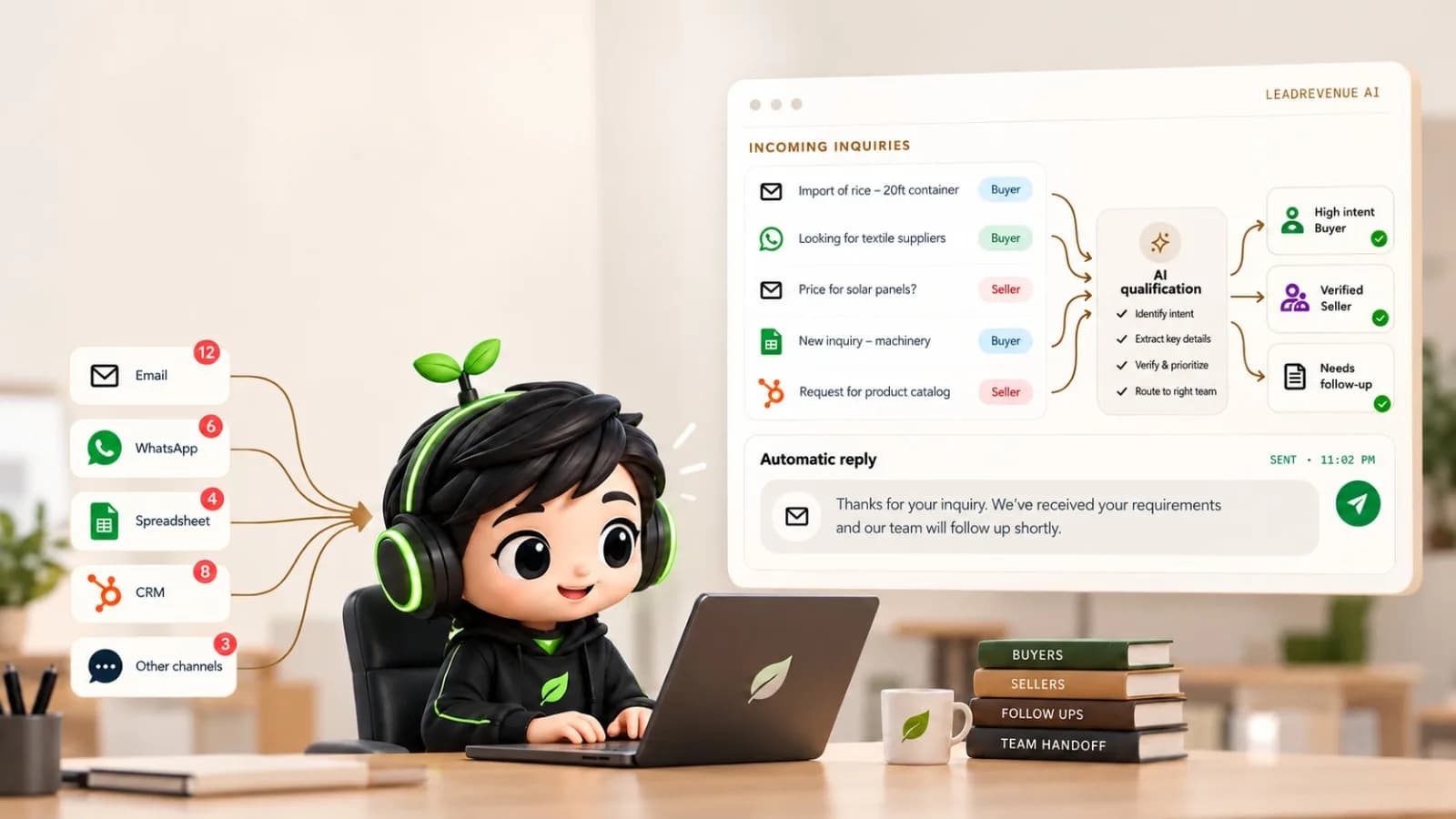
Five specialized workers. One coordinated system.
Each worker has exactly one well-defined job. Together, they move an inquiry from an unread message to a qualified, CRM-synced lead in 60 seconds.
“Looking for 500 MT of recycled aluminum 6063. Please send quote...”
One worker per channel
A buyer message arrives through any connected channel: email, WhatsApp, Instagram, or Facebook. Each channel has its own dedicated monitor.
A research worker
Visits sender website, checks WHOIS registration records, and cross-references trade history before confirming creditworthiness.
Lead Intent Evaluation
Configured Rules Match
Scoring & qualification
Extracts structured specifications, validates trade context, and scores buyer intent 0–100 against your configured rules.
A follow-up worker
A tone-matched reply goes out in under 60s in your voice, and multi-step follow-up sequences are automatically scheduled.
MetalCorp — 500 MT Alum
Stage: Qualified RFQ ($420k)
A CRM worker
Your team opens their dashboard with qualified leads already prioritized. All contact & trade specs sync directly to CRM.
All of these can run at the same time. Trigger them together with one click, trigger just one channel on its own, or, with full automation turned on, let them run autonomously on an hourly schedule with nobody clicking anything at all.
What happens when a buyer replies?
An automated reply is just the beginning. When a buyer responds, LeadRevenue AI understands the message, updates the conversation, and determines the next action.
MetalCorp Trading
OnlineHi, can you share your best price for 500 MT?
11:24 AMSure! I'll share the quotation shortly. Please confirm the delivery destination.
Intent detected: Pricing request
AI Responds
When permitted by configured rules.
Human Handover
Sales team takes over when needed.
The reply is detected
The channel monitoring worker detects the buyer's incoming response and connects it to the existing conversation.
AI understands the buyer's intent
The system analyzes the response to identify what the buyer wants: a quotation, more details, product specifications, or pricing.
Follow-ups are adjusted
Previously scheduled follow-ups are paused or rescheduled according to your configured rules.
The conversation is updated
The system updates the lead's information, conversation history, and qualification status.
The next action is determined
Based on the buyer's intent, the system decides whether another automated response is needed or if human attention is required.
Your sales team takes over when needed
When human involvement is required, the conversation is handed over to your team with full context and history.
The result: No lost conversation, no forgotten follow-up, and a sales team that knows exactly where every opportunity stands.
Automated workers following clear rules, not an autonomous agent.
Each worker does exactly one well-defined job, the same way, every time. That's a deliberate design choice, not a shortcoming: something that reads and replies to your customers' messages under your own name should be predictable and auditable, not a black box making its own judgment calls you can't fully explain afterward. You can always see exactly what each worker did and why a lead got the score it got. You can't do that with a truly autonomous agent.
What a day actually looks like, walked through
A buyer messages your WhatsApp Business number at 11pm asking about a shipment of a specific material.
The system picks it up automatically, has AI read and understand the request (material, quantity, destination) and checks it against your configured categories and scoring rules.
It's scored, sorted into the right sheet, and an automatic first reply goes out in your company's name and tone. The buyer has a response before your team is even awake.
Your team opens the dashboard in the morning, sees it already triaged with a score and an AI-written summary, and picks up the conversation from wherever the automated reply left off.
If no reply comes back, the system follows up again on your configured schedule (day 3, day 5, and so on) without anyone having to remember to do it.
Once qualified, it's pushed into your CRM automatically, ready for your sales process to take over.
The Contrast Is Real
Why traditional sales operations leak 0% of trade value while LeadRevenue AI captures every high-margin inquiry.
The Old Manual Way
Manual & Slow12-14 hour latency: Inquiries sit in unmonitored WhatsApp or shared inboxes overnight, giving buyers time to shop competitors.
3 hours lost daily: Reps burn prime selling hours re-typing trade specifications from messages into the CRM by hand.
Lost deals through fatigue: Inconsistent follow-up cadence; promising deals slip through the cracks during busy shipping cycles.
15 min domain checks: Reps manually look up corporate registry and WHOIS records before confirming creditworthiness.
With LeadRevenue AI
Automated & Exact< 0s response: Every incoming buyer inquiry receives a tone-matched quote in real-time, 24/7/365.
Zero manual data entry: Seamless automated parameter parsing and deep CRM record creation with structured incoterms.
Smart yielding follow-up: Disciplined autonomous touchpoints that instantly hand control over when a client replies.
Sub-second registry checks: Automatic trade compliance and corporate verification executed before your rep opens the dashboard.
Live in Under 48 Hours
No months-long systems integration. We configure on top of your existing communication tools and CRM.
Connect Channels
Connect your WhatsApp Business API, corporate Google Workspace or Microsoft 365, and website contact webhook.
Upload Rules & Voice
Ingest your standard product catalog, pricing matrices, margin floors, CIF/FOB terms, and sample email threads to clone your voice.
Historical Simulation & Go-Live
Run 20 of your past anonymized customer messages through the engine. Verify 100% precision with your leadership team and flip the switch.
Everything you need to know about how it works
Clear answers on channel monitoring, scoring rules, CRM integrations, and how our automated workers support your team.
Which channels does LeadRevenue AI support?
Email, WhatsApp, Facebook Messenger, Facebook comments, and Instagram, plus importing an existing spreadsheet of past inquiries or contacts, all live today. WeChat, Line, and Telegram are available as a scoped custom integration. Turn on only the channels you actually use.
Does this replace my sales team?
No. LeadRevenue AI handles the reading, scoring, and first-line reply. Your team handles the actual relationship and closing. It's built to step back the instant a real person replies, so it never talks over your team.
Which CRM does this work with?
Odoo, Salesforce, HubSpot, Zoho, and Pipedrive all work today, out of the box: leads, contact details, and offer records sync automatically to whichever one your team runs. Don't have a CRM at all yet? We can set you up with Odoo as part of onboarding. Running something outside this list is a scoped custom integration we can talk through as part of an Enterprise engagement.
Will my customers know a third-party platform is involved?
No. Every message goes out under your own brand: your name, your domain, your sender identity. The only place LeadRevenue AI is visible at all is a small credit on your own internal team's login screen and dashboard, never anything a lead or prospect sees.
Is our data shared with any other customer?
No. Every account runs in its own fully isolated environment: leads, credentials, and configuration are never shared across customers.
Do we need our own servers?
No, the application, database, and infrastructure are fully hosted. You bring your own channel and AI provider accounts; we never need your servers.
How long does setup take?
It depends on how many channels you're connecting and how much your categories, scoring rules, and reply tone need configuring. We'll give you a specific timeline as part of your demo, not a generic number that doesn't match your setup.
Can we customize what counts as a good lead?
Yes, your categories, scoring rules, follow-up timing, and reply tone are all configured per account through a guided onboarding flow, not a fixed one-size-fits-all setup.
Watch it run on a real inquiry.
See exactly what happens from the moment an inquiry arrives to the moment your team gets a qualified lead.
Book a Demo